Smart Genie: A Quirky Display Font for Playful Digital Branding
I was staring at a blank Figma canvas, trying to find the right personality for a new landing page. The client wanted something that felt approachable but not childish, creative but still professional. I had already tested several modern sans serif fonts, but they felt too corporate. Then I imported Smart Genie, and suddenly the entire layout shifted. This isn't just another decorative typeface; it is a distinct visual tool that solves specific UX problems in digital design.
If you are a web designer or UI creator looking to add warmth and character to your projects, understanding how to integrate a quirky display font like Smart Genie can transform your digital presence. Below, I share my practical experience testing this font in real-world web layouts, from hero sections to mobile navigation, and why it deserves a spot in your design toolkit.
Why Smart Genie Works as a Creative Display Font for Web Headers
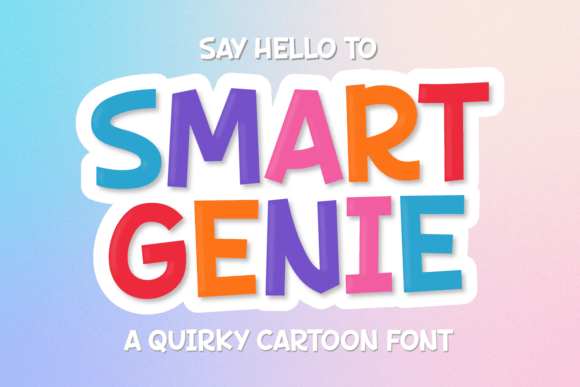
When we talk about Smart Genie, we are talking about a display typeface designed to grab attention immediately. In web design, the first three seconds are critical, and typography is often the first element users notice. Unlike standard body text fonts, Smart Genie has a playful and irregular shape that gives it a friendly and approachable vibe. This makes it an excellent choice for creative branding where you want to stand out from the sea of sterile, geometric sans serifs.
I used Smart Genie for the main headline on a coaching website homepage. The goal was to make the visitor feel welcomed before they even read the subheading. Because the letters have slight variations in their strokes and curves, the eye naturally lingers on them. It creates a sense of movement and energy without being chaotic. As a font family, it serves as a powerful anchor for your visual hierarchy. When paired with clean, neutral body text, Smart Genie allows the brand voice to shine through in the headings while maintaining readability in the supporting content.
Smart Genie for Educational Project Landing Pages
One of the most effective use cases I found for Smart Genie is in the realm of education and learning. Whether you are building a sales page for an online course, a workshop registration site, or a children’s educational app, the font’s personality aligns perfectly with these niches. Its quirky nature suggests creativity and fun, which lowers the barrier to entry for learners who might feel intimidated by more formal academic designs.
In a recent project for a digital marketing course, I replaced the generic bold sans serif header with Smart Genie. The result was a softer, more inviting interface. Users reported (anecdotally) that the course felt less like a textbook and more like a conversation. This is the power of choosing the right fonts for your audience. By using a font that reflects the tone of your content, you build trust faster. Smart Genie signals that the material inside is accessible, engaging, and perhaps a bit unconventional in a good way.
How Smart Genie Enhances Readability and User Engagement
A common misconception about display fonts is that they sacrifice readability for style. However, Smart Genie strikes a delicate balance. While it is undeniably stylized, its open counters and clear letterforms ensure that it remains legible at larger sizes. For web designers, this means you can use it confidently in hero sections, banner ads, and call-to-action areas without worrying that users will struggle to decode the message.
I tested Smart Genie across various screen sizes, including mobile devices. On smaller screens, large display fonts can sometimes cause layout issues if not sized correctly. I found that keeping the font size between 32px and 48px worked best for mobile headers. Anything smaller began to lose its distinctive character, turning into a blurry mess of pixels. For desktop views, scaling up to 64px or higher allowed the quirks of the letterforms to breathe.
Furthermore, the font’s irregularity helps break up "banner blindness." Users are conditioned to ignore uniform blocks of text. A headline set in Smart Genie disrupts this pattern, drawing the eye to the key message. This is crucial for conversion rate optimization. If your value proposition is hidden behind a wall of boring text, users will scroll past. But if your headline pops with personality, they are more likely to stop and engage.
Smart Genie for Boutique Online Store Banners
For e-commerce, especially boutique stores selling handmade goods, art supplies, or creative kits, visual appeal is everything. I applied Smart Genie to product banners for a small business selling artisanal candles. The font’s whimsical style complemented the handcrafted nature of the products. It didn’t look like a mass-produced corporation; it looked like a passion project.
When designing online shop banners, consistency is key. Using Smart Genie for section titles like "New Arrivals" or "Best Sellers" created a cohesive brand identity. It also worked well for short promotional phrases like "Sale" or "Limited Edition." Because the font is visually heavy, it commands attention without needing loud colors or complex graphics. This simplifies the design process, allowing you to focus on high-quality product photography rather than cluttering the layout with excessive decorative elements.
Strategic Font Pairing and Technical Considerations
No display font works in isolation. To get the most out of Smart Genie, you need to pair it wisely. My go-to combination is Smart Genie for headlines and a clean, humanist sans serif for body copy. Fonts like Inter, Lato, or Open Sans provide a neutral backdrop that lets Smart Genie take center stage. This contrast ensures that while the headings are fun and engaging, the detailed information remains easy to scan and read.
Before implementing any new typeface in a production environment, technical due diligence is essential. Always check the file formats included with the download. For web use, you will typically need WOFF2 files for optimal performance. Ensure that the font supports the languages you need, especially if your audience is global. Additionally, verify the licensing terms. Since Smart Genie is a commercial font, make sure your license covers web usage, particularly if you are using it on client projects or high-traffic sites.
Another practical tip is to test the font against different background colors. Smart Genie looks fantastic on light backgrounds, where its dark, solid forms stand out clearly. On dark backgrounds, it can appear slightly heavier, so you may need to adjust the weight or spacing to maintain balance. I also recommend using CSS properties like `letter-spacing` and `line-height` to fine-tune the appearance. Slightly increasing the tracking can help the irregular shapes of Smart Genie feel more airy and less cramped.
Smart Genie for Portfolio Sites and Creative Agencies
For creatives showcasing their work, your portfolio site is your digital business card. Using Smart Genie in your personal brand kit can instantly communicate your style. It tells visitors that you are detail-oriented but also imaginative. I used it for the nameplate on a graphic designer’s portfolio. It became a memorable part of the brand, appearing consistently across social media graphics, email signatures, and the website footer.
This consistency builds recognition. When potential clients see Smart Genie everywhere, they associate those qualities—quirky, friendly, professional—with your work. It acts as a visual signature. Just be mindful not to overuse it. Reserve Smart Genie for primary headings and key accents. Let your work speak for itself in the body text, and let the typography set the mood.
Final Implementation Tips for Digital Designers
Incorporating Smart Genie into your workflow requires a shift in perspective. You are no longer just arranging text; you are curating an experience. Every time you choose a display font, you are making a statement about your brand’s values. Smart Genie says, "We are here to have fun, but we mean business."
As you experiment, remember that good design is iterative. Test different weights, sizes, and pairings. Use tools like Google Fonts or Adobe Typekit to preview how Smart Genie interacts with other elements in your layout. Pay attention to whitespace. Display fonts thrive when they have room to breathe. Don’t crowd them with dense paragraphs of text nearby.
Ultimately, the goal is to create a digital experience that feels human. In a world of AI-generated content and templated websites, a unique typeface like Smart Genie adds a layer of authenticity. It reminds users that there is a person behind the screen, someone who cares about the details. Whether you are designing a simple blog post or a complex e-commerce platform, investing time in finding the right font pays off in user engagement and brand loyalty. Smart Genie is more than just a pretty face; it is a strategic asset for any designer looking to elevate their craft.